
calcuis/gguf-node
1620k
gguf-node test pack
<img src="https://raw.githubusercontent.com/calcuis/comfy/master/gguf.gif" width="128" height="128">
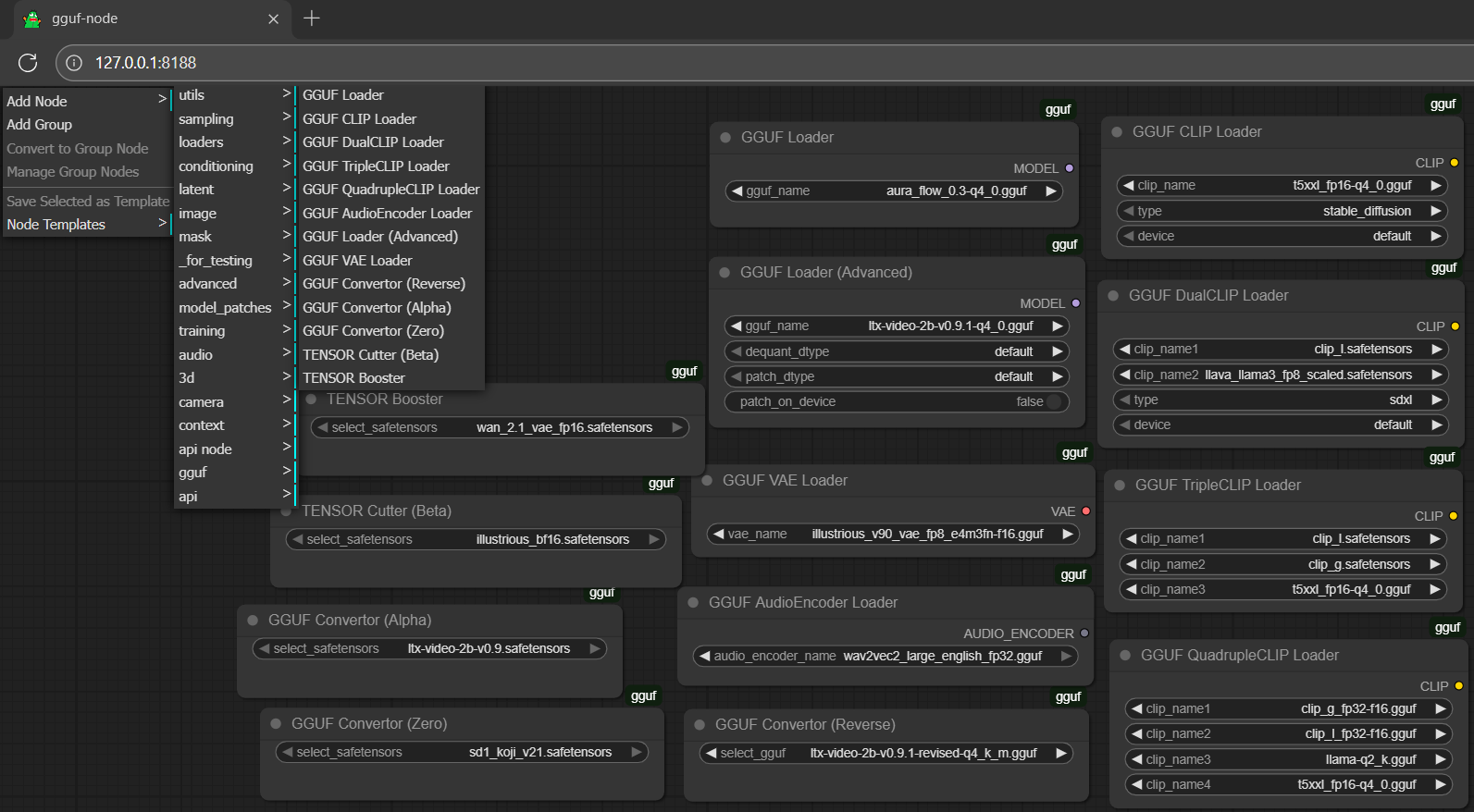 locate gguf from Add Node > extension dropdown menu (between 3d and api; second last option)
setup (in general)
- drag gguf file(s) to diffusionmodels folder (`./ComfyUI/models/diffusionmodels`)
- drag clip or encoder(s) to textencoders folder (`./ComfyUI/models/textencoders`)
- drag controlnet adapter(s), if any, to controlnet folder (
./ComfyUI/models/controlnet) - drag lora adapter(s), if any, to loras folder (
./ComfyUI/models/loras) - drag vae decoder(s) to vae folder (
./ComfyUI/models/vae)
run it straight (no installation needed way; recommended)
- get the comfy pack with the new gguf-node (pack)
- run the .bat file in the main directory
or, for existing user (alternative method)
- you could git clone the node to your
./ComfyUI/custom_nodes(more details here) - either navigate to
./ComfyUI/custom_nodesfirst or drag and drop the node clone (gguf repo) there
workflow
- drag any workflow json file to the activated browser; or
- drag any generated output file (i.e., picture, video, etc.; which contains the workflow metadata) to the activated browser
simulator
- design your own prompt; or
- generate random prompt/descriptor(s) by the simulator (might not applicable for all models)
<Gallery />
booster
- drag safetensors file(s) to diffusionmodels folder (./ComfyUI/models/diffusionmodels)
- select the safetensors model; click
Queue(run); simply track the progress from console - when it was done; the boosted safetensors fp32 will be saved to the output folder (./ComfyUI/output)
cutter (beta)
- drag safetensors file(s) to diffusionmodels folder (./ComfyUI/models/diffusionmodels)
- select the safetensors model; click
Queue(run); simply track the progress from console - when it was done; the half-cut safetensors fp8_e4m3fn will be saved to the output folder (./ComfyUI/output)
convertor (alpha)
- drag safetensors file(s) to diffusionmodels folder (./ComfyUI/models/diffusionmodels)
- select the safetensors model; click
Queue(run); track the progress from console - the converted gguf file will be saved to the output folder (./ComfyUI/output)
convertor (reverse)
- drag gguf file(s) to diffusionmodels folder (./ComfyUI/models/diffusionmodels)
- select the gguf model; click
Queue(run); track the progress from console - the reverse converted safetensors file will be saved to the output folder (./ComfyUI/output)
convertor (zero)
- drag safetensors file(s) to diffusionmodels folder (./ComfyUI/models/diffusionmodels)
- select the safetensors model; click
Queue(run); track the progress from console - the converted gguf file will be saved to the output folder (./ComfyUI/output)
- zero means no restrictions; different from alpha; any form of safetensors can be converted; pig architecture will be applied for the output gguf
latest feature: gguf vae🐷 loader is now working on gguf-node
- gguf vae is able to save memory consumption of your machine
- convert your safetensors vae to gguf vae using convertor (zero)
- then use it with the new gguf vae loader
- same as gguf clip loaders, gguf vae loader is compatible with both safetensors and gguf file(s)
disclaimer
- some models (original files) as well as part of the codes are obtained from somewhere or provided by someone else and we might not easily spot out the creator/contributor(s) behind, unless it was specified in the source; rather let it blank instead of anonymous/unnamed/unknown
- we hope we are able to make more effort to trace the source; if it is your work, do let us know; we will address it back properly and probably; thanks for everything
reference
- sd3.5, sdxl from stabilityai
- flux from black-forest-labs
- pixart from pixart-alpha
- lumina from alpha-vllm
- aura from fal
- mochi from genmo
- hyvid from tencent
- wan from wan-ai
- ltxv from lightricks
- cosmos from nvidia
- pig architecture from connector
- comfyui from comfyanonymous
- comfyui-gguf from city96
- llama.cpp from ggerganov
- llama-cpp-python from abetlen
- gguf-connector (pypi|repo)
- gguf-node (pypi|repo|pack)